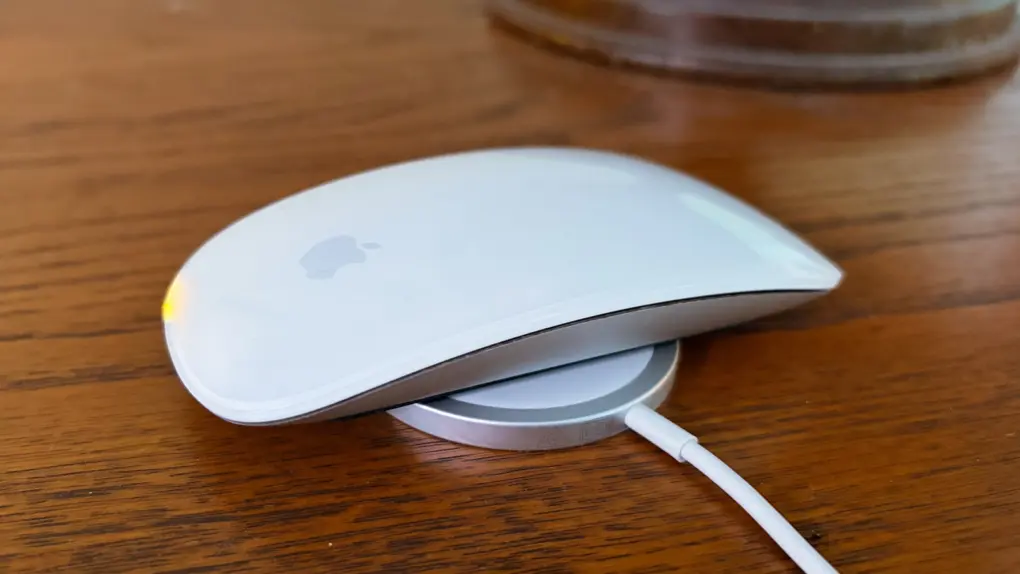
The charging port on the bottom of the Magic Mouse draws criticism — mostly from people who’ve never actually used one. But there’s a way Apple could quiet the complaints and improve the product at the same time: add MagSafe wireless charging.
The mouse could keep its iconic design, become easier to charge and the critics would have to find something else to complain about.
This post contains affiliate links. Cult of Mac may earn a commission when you use our links to buy items.
Why Apple should add MagSafe to the Magic Mouse
Apple’s Magic Mouse combines a sleek minimalist shape with a touch-sensitive multi-touch surface. Introduced in 2009, the accessory dumped physical scroll wheels and buttons for gesture controls that let users swipe and scroll using their fingers.
The original version used AA batteries, but 2015 brought the rechargeable Magic Mouse 2 with a Lightning charging port. And here’s where the controversy starts: its charging port is on the bottom, so the mouse cannot be used while plugged in. There
The criticism is badly overblown because just two minutes of charging can provide roughly eight to nine hours of use. Two minutes. A full recharge takes longer, of course, but can last for months.
But there’s a solution. One that would let the Magic Mouse keep its sleek design while making it even easier to charge.
Apple’s mouse needs wireless charging
Imagine it’s the end of the workday, and you’re packing up to head home. Right after putting your computer to sleep, you place the Magic Mouse on your iPhone’s wireless charging stand. Or maybe it’s a charging mat built into your desk mat. And that’s all it’ll take to be sure the mouse is ready to go tomorrow.
Maybe you only remember to do that once a week. Or once a month. It won’t matter — the Magic Mouse will keep running.
That’s all that will be needed if Apple adds MagSafe to the Magic Mouse 3 (whenever that comes out).
Wireless charging would also put the accessory more in line with the rest of Apple’s ecosystem — iPhones, AirPods and other accessories increasingly offer the convenience of wireless charging.
To be clear, I’m not suggesting that Apple drop the USB-C port. The Magic Mouse should have both wired and wireless charging to let people juice up however they prefer. It’s a premium product and should offer a full range of features.
Apple upgraded the Magic Mouse with USB-C in 2024, after not touching the design for almost a decade. A third-generation model is unlikely for years. But when the time comes, adding MagSafe should be at the top of the list of enhancements.
Size matters not
There’s a small wrinkle in this: the Magic Mouse design might not be wide enough for a standard MagSafe charging mat. Maybe the bottom of the third-gen model needs to be just a bit larger?
But that’s not the only option because Apple already solved this problem for the AirPods charging case. This isn’t the standard size, but can nevertheless juice up from a standard inductive charging puck. It can also draw power from an Apple Watch charger. This option wouldn’t be as easy to use, but it would negate the need to redesign the Magic Mouse 3 for MagSafe.
Magic Mouse is wireless and rechargeable, with an optimized foot design that lets it glide smoothly across your desk. The Multi-Touch surface allows you to perform simple gestures such as swiping between web pages and scrolling through documents. The rechargeable battery will power your Magic Mouse for about a month between charges.
- Multi-Touch gestures
- Slim design
- USB-C port on bottom

Why no visible USB-C port?
Hiding the charging point on the Magic Mouse frustrates some people because they think the solution is obvious. But an external port would interrupt the clean, curved shell and symmetrical look Apple wants for the product.
No company can make a mouse that pleases everyone — what people want stretches across too huge a range. Apple decided to make one that satisfies those who want a minimalist mouse, with no visible ports, buttons, scroll wheel … anything.
But if that’s not what you like, you have at least a thousand other options. If you prefer a very popular mouse that emphasizes function over looks, you owe it to yourself to consider the Logitech MX Master 3S.
Logitech's flagship MX Master mouse stands out for its precision, features and ergonomic design. The 8K Darkfield sensor ensures the mouse can track on any surface, with the Quiet Click technology helping provide near-silent clicks. Take advantage of the customization buttons and electromagnetic scroll wheel to further boost your productivity.
- 8K DPI sensor
- Exhaustive set of features
- Customizable buttons
- Prone to connection dropping issues on Macs


Ed Hardy has been writing full-time about tech for 25 years, and using it for much longer than that. His intro to Apple was a Macintosh SE/30 (which he still has), but now he uses a 13-inch iPad Pro as his primary computer.
That’s because he’s a “tablet first” type of guy. Rather than use a Macbook, he connects a keyboard case to the iPad. And instead of a desktop Mac, he connects his tablet to a 27-inch display and full-size keyboard. (So don’t try to tell him that everyone has to use a Mac to be productive.)
Before coming to Cult of Mac, Ed wrote for NotebookReview, TabletPCReview and Brighthand, as well as other sites.

